
Before you scan
Learn how framing, even light, and a full view of the question make worksheet scans easier to trust.
Take a better homework photo →AI homework help & study guides
Practical guides for homework scanning, AI tutor prompts, flashcards, quizzes, exam prep, and planning—written for real school nights.

Start with your current question
Better help starts with a sharper question and one practice step before you close the app—not a longer answer dump.
Learn how framing, even light, and a full view of the question make worksheet scans easier to trust.
Take a better homework photo →Use hints, first steps, and teach-backs so you understand the method—not just the final number.
Use Lirno Tutor step by step →Turn tonight’s topic into flashcards, a quiz, or a mission so the idea survives until the next class.
Turn homework into practice →
Featured · Homework planning
Use a 15-minute reset to turn a crowded homework list into one clear, finishable first step.
Read the essential guide →The Lirno study library
Pick one guide, apply it to tonight’s real assignment, and keep the one habit that makes the next session easier.

Use this free linear equation homework help to understand balance, isolate the variable, check each move, and practise the method instead of copying an answer.
9 min read · Read guide →
Learn how to balance chemical equations by counting atoms, changing coefficients, checking every element, and practising the reasoning instead of guessing an answer.
9 min read · Read guide →
Learn how to write a thesis statement that answers the prompt, makes a focused claim, gives the essay direction, and can be supported with evidence.
9 min read · Read guide →
Use this free geometry homework help to read the diagram, choose the right angle fact, show each reason, and check the result without copying an answer.
9 min read · Read guide →
Learn how to analyze a primary source by connecting its origin, context, purpose, audience, evidence, perspective, and limits to the exact history question.
9 min read · Read guide →
Learn how to learn vocabulary with flashcards by choosing useful words, writing clear prompts, practising both directions, spacing reviews, and using each word beyond the deck.
9 min read · Read guide →
Use this free physics homework help to isolate an object, find every external force, draw a clean free-body diagram, and check it before writing equations.
9 min read · Read guide →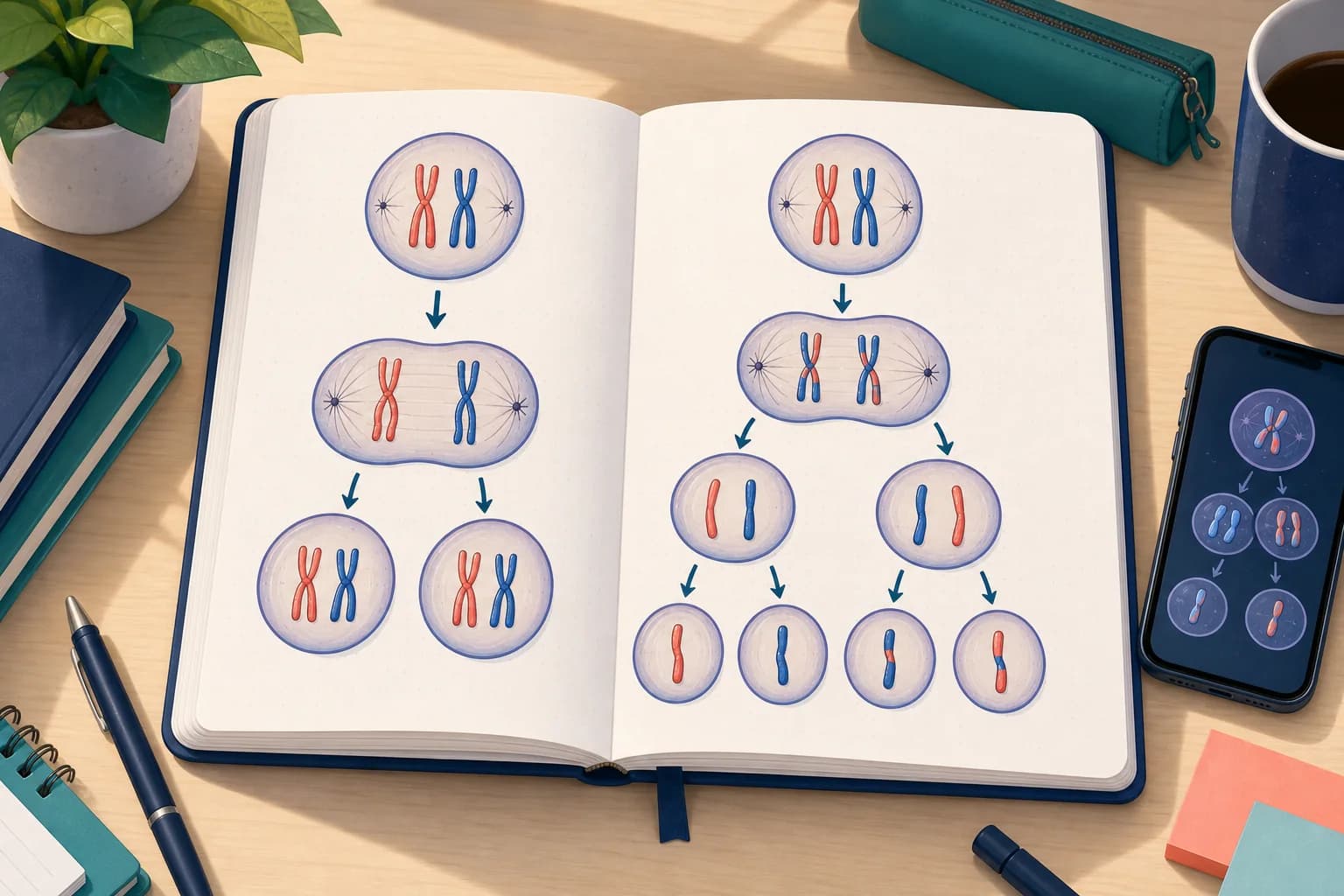
Compare mitosis vs meiosis by purpose, number of divisions, chromosome behavior, and final cells—then use the pattern to solve diagrams and homework questions.
9 min read · Read guide →
Learn how to make a quiz from notes by choosing testable ideas, mixing question types, checking every answer, and using mistakes to plan the next round.
9 min read · Read guide →
Use a free AI homework scanner to capture the complete assignment, check what was read, ask for the smallest useful hint, and turn one difficult question into practice.
9 min read · Read guide →
Learn how to summarize a text by finding its central claim, selecting essential support, writing from memory, and checking every sentence against the source.
9 min read · Read guide →
Use AI for homework without handing over the thinking: check the rules, make an attempt, ask for the smallest useful help, verify it, and practise the idea yourself.
11 min read · Read guide →
Set up a monohybrid Punnett square correctly, separate genotype from phenotype, calculate probabilities, and catch the mistakes that spoil otherwise good genetics work.
11 min read · Read guide →
Use AI feedback to find grammar problems, understand the rule, revise your own English, and build practice from the mistakes you actually make.
11 min read · Read guide →
Learn what each measure says, calculate it reliably, handle awkward datasets, and choose the summary that actually fits the question.
11 min read · Read guide →
Turn an exam date, a real syllabus, and the time you actually have into a flexible study schedule built around recall, practice, and recovery.
11 min read · Read guide →
Keep every claim connected to its source, choose quotations and paraphrases deliberately, and make the in-text citations match the reference list.
11 min read · Read guide →
Use a practical checklist to judge scanning, tutoring, practice, planning, privacy, and free limits before trusting an app with real schoolwork.
11 min read · Read guide →
Put the equation in standard form, read its structure, and choose factoring, square roots, completing the square, or the quadratic formula with confidence.
11 min read · Read guide →
Use AI feedback to inspect your own work, locate the earliest mismatch, repair the reasoning, and turn one mistake into useful practice.
11 min read · Read guide →
Understand the mole, calculate molar mass, convert grams and particles, and check each chemistry result without copying an answer.
12 min read · Read guide →
Learn to describe a historical cartoon, test its symbols and context, and use an AI tutor without letting it invent the interpretation.
12 min read · Read guide →
Use your measurements to answer the experiment question, explain uncertainty, and write a conclusion that does not overclaim.
12 min read · Read guide →
Work from the full passage to a supported inference, then use a narrow hint or check without surrendering your own answer.
12 min read · Read guide →
Calculate increases and decreases from the original value, distinguish percentage points, and check whether an answer fits the situation.
12 min read · Read guide →
Turn a value table into a reliable line by checking equal changes, plotting ordered pairs, and using AI feedback only after your own attempt.
12 min read · Read guide →
Follow carbon, water, oxygen and light through the school-level equation, then check the atoms and explain what the shorthand leaves out.
11 min read · Read guide →
Turn an assignment prompt into a question, provisional claim, evidence plan, and first draft without asking AI to write the essay for you.
12 min read · Read guide →
Read both axes, describe the annual pattern, identify wet and dry periods carefully, and turn observations into a supported climate interpretation.
12 min read · Read guide →
Use shape, position, cell type, and function to label an unfamiliar cell diagram, then check each answer and turn mistakes into practice.
12 min read · Read guide →
Understand density as mass per unit volume, choose the right form of the equation, measure irregular objects, convert units, and check whether an answer makes physical sense.
12 min read · Read guide →
Turn a word problem into two meaningful equations, choose a solving method, and use AI hints without giving away the modelling work.
13 min read · Read guide →
Find the median and middle half, compare two groups carefully, and avoid treating a box plot as a picture of every observation.
12 min read · Read guide →
Use a real pond worksheet to identify producers and consumers, point every arrow the right way, and explain what the model can and cannot predict.
12 min read · Read guide →
Build a short, evidence-led timeline that helps you recall order, context, causes, and consequences instead of memorising isolated dates.
12 min read · Read guide →
Trace connections before calculating: identify shared current, shared voltage, and the first place a mixed-circuit answer can go wrong.
12 min read · Read guide →
Use the contour interval, line spacing, and height labels to turn a flat map into a careful explanation of the terrain.
12 min read · Read guide →
Turn an active sentence into a passive one without losing its meaning. Use a targeted hint only after identifying the sentence roles.
12 min read · Read guide →
Build a two-draw tree, update the remaining counters, and distinguish one ordered path from all the paths that answer the question.
12 min read · Read guide →
A plain-English look at how an AI study companion can explain homework, when it helps, and where students still need judgment.
7 min read · Read guide →
A practical camera checklist so Lirno can read worksheets, textbook pages, and handwritten problems more clearly.
6 min read · Read guide →
Prompt patterns that get clearer explanations, better hints, and more useful checks of your own work.
8 min read · Read guide →
Move from “I finished the worksheet” to flashcards, quizzes, missions, and Lesson Studio review.
7 min read · Read guide →Use Lirno’s homework inbox, today-first focus, and missions to keep assignments visible and actionable.
6 min read · Read guide →
Build an exam plan from weak topics, practice quizzes, Lesson Studio reviews, and focused study blocks.
8 min read · Read guide →A practical workflow for word problems, algebra, and scanned worksheets when you want understanding—not just the final number.
7 min read · Read guide →
Outline, clarify, and revise with Lirno’s writing help while keeping the thinking and wording yours.
7 min read · Read guide →How these guides are written
Every workflow begins with the worksheet, question, deadline, or exam topic already in front of you.
Hints, checks, and teach-backs come before shortcuts that remove the useful reasoning.
AI can misread inputs or explain a different method. Important work still needs verification and school rules still apply.
A 20-minute homework rescue
When a student is tired and stuck, the best workflow removes one obstacle at a time. A short session can still create understanding, an attempt, and a useful return point.
Spend the first two minutes making the input trustworthy. Capture the entire question, read the instructions again, and name the exact point where the work stops. If several tasks are open, choose the one that blocks the others or carries the nearest deadline.
Use the next ten minutes for one tutoring loop. Ask for a hint or setup, attempt the next step, and use Check on the work you produced. If the concept itself is unfamiliar, ask for a plain-language explanation and a small example before returning to the assignment.
Finish with retrieval and planning. Hide the explanation, state the method in your own words, and answer one small no-notes question. Save the mistake or create a short practice set, then place the next review where it can realistically happen. The outcome is a clearer path, not an endless chat.
Open the step-by-step Tutor guide →Keep instructions and diagrams visible, then name the precise stuck point.
Ask for the smallest useful help, attempt the next move, and check your reasoning.
Test the idea without notes and schedule the next return only if recall is still weak.
Prompt patterns that preserve learning
A stronger request includes the real task, the student’s attempt, and the desired depth of help. These patterns work across subjects because they define the learning job—not a magic phrase.
Try: “Restate what this question is asking, name the concept, and give me one clue—not the full answer.” This separates misunderstanding the prompt from not knowing the method.
After the clue, write the first line yourself. If the first line is still unclear, ask what information should appear in the setup and why it belongs there.
Try: “Explain this for my grade level using one small example, then ask me a question before applying it to my homework.” A useful simplification keeps the relationship intact while reducing unfamiliar vocabulary.
If an analogy is used, ask where it stops matching the real concept. That prevents a memorable shortcut from replacing the precise explanation your class expects.
Try: “Check my work. Keep every step that is correct and identify the first place the reasoning changes.” Include the full attempt rather than only the answer so feedback can target the process.
Ask for the error type as well as the correction: sign, unit, assumption, definition, evidence, structure, or calculation. That label can become a Mistake Book rule and a future review prompt.
Try: “Give me a similar problem with one important detail changed. Do not show the answer until I commit to a method.” A transfer question reveals whether the student can choose the idea without copying the original path.
For writing or humanities, transfer can mean applying the same analytical lens to a new paragraph or source. For languages, it can mean producing the form in a different sentence rather than recognizing it in a list.
A useful prompt in one line
Those three pieces give Lirno enough context to help while keeping a meaningful decision with the student. If the response is still too broad, narrow the stuck point instead of adding unrelated detail.
Understand what an AI homework helper can do →From one assignment to a study week
A realistic plan does not schedule every topic equally. It uses evidence from homework, mistakes, recall, and deadlines to decide what returns, when it returns, and what can be left alone.
Do not turn every solved line into a flashcard. Name the one relationship, definition, procedure, or argument move that caused the delay and create a small retrieval question around it.
If the issue was a repeated process error, save the correction rule and one representative example. The goal is a compact signal you can test again, not a second copy of the worksheet.
Before rereading, try to state the method or answer the saved question from memory. Mark whether recall was clear, partial, or unavailable and use that evidence to choose the next action.
Clear recall can leave the schedule. Partial recall needs one targeted example. No recall may need a fresh explanation followed immediately by another attempt.
Build active-recall practice →Start with a short diagnostic instead of rereading every chapter. Use the result to group topics into ready, shaky, and unknown, then spend the longest block where retrieval or application actually fails.
Include at least one mixed question that does not announce the method. Exams often test whether the student can identify the approach, not only perform it after being told which chapter applies.
Protect fixed deadlines and assessments first. Break large assignments into visible outputs such as choose sources, outline, draft one section, or complete questions 1–5 rather than scheduling a vague block called homework.
Use 15-, 25-, or 50-minute focus blocks that fit the available energy. A smaller plan that can start tonight is more useful than a perfect schedule that depends on an uninterrupted evening.
The weekly rule
Homework difficulty, repeated mistakes, weak no-notes recall, and upcoming deadlines are useful planning signals. Use them to concentrate attention where another visit can change readiness.
Read the homework planning guide →Use AI help responsibly
Generated explanations can be convincing and still be wrong, incomplete, or different from the method your course expects. Verification is part of the learning workflow, not an optional final disclaimer.
Check every sign, exponent, unit, diagram label, instruction, quotation, and constraint after a scan or file import. A clean explanation cannot repair a problem that began with the wrong task.
If one detail is uncertain, type it directly or capture a clearer section before continuing.
Inspect the setup, definitions, notation, evidence, and intermediate steps. Ask why each move follows and compare it with notes, worked examples, rubrics, or another trusted source.
When approaches differ, ask Lirno to explain the difference—then follow the method your teacher requires for graded work.
Hide the response and restate the idea, rebuild the outline, or solve a similar task. If the method disappears when the answer closes, the session needs one more retrieval step.
Follow your school’s academic integrity policy and use AI only where the teacher allows it.
Use the complete verification checklist →Choose a guide by the learning job
Do not judge every study session by whether a page is complete. Choose the guide and follow-up action that matches what the subject asks you to retrieve, produce, or apply.
For math, physics, chemistry, statistics, and other quantitative work, keep signs, units, diagrams, and intermediate reasoning visible. Ask why the relationship fits before substituting values.
Finish with a changed problem whose method is not announced. The student should identify the approach, carry out the steps, and check whether the result is reasonable.
For essays, literature, history, and source responses, translate the prompt and rubric before drafting. Give each paragraph a job and ask whether the selected evidence actually supports the claim.
Use AI to question structure and reveal missing reasoning while keeping quotations, citations, interpretation, and final language under deliberate student control.
For biology, geography, languages, definitions, and multi-stage processes, create prompts that require production: name the step, explain the relationship, complete the sentence, or distinguish two common mix-ups.
Return without notes, then use the result to decide whether the topic needs another example, a shorter explanation, or no further review today.
Across every subject
That may be choosing a formula, defending a claim, producing a language form, labeling a process, or planning the next step. Use the guide that makes that performance visible.
Match each learning job to a Lirno feature →